Swift中的集合类型:数组(Array)、集合(Set)、字典(Dictionary)。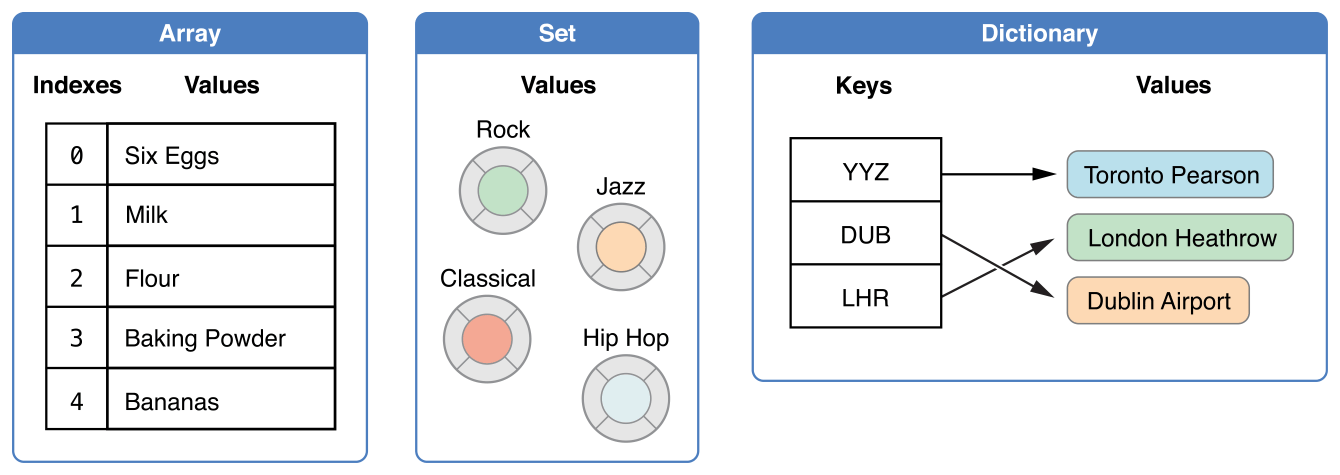
集合分可变和不可变,可变集合:创建之后可以增加、删除、改变数据项,不可变集合:大小和内容都不可改变
1.数组
1.1 数组的简单语法
Swift中数组的完整写法为:Array<Element> 或者 Array[Element]。
1.2 创建数组
1.2.1 创建空数组
var someInts = [Int]()
var someInts: [Int] = []
1.2.2 创建带有默认值的数组
var threeDoubles = Array(repeating: 0.0, count: 3) //[0.0, 0.0, 0.0]
1.2.3 通过两个数组相加创建一个数组
var threeDoubles = Array(repeating: 0.0, count: 3) //[0.0, 0.0, 0.0]
var anotherThreeDoubles = Array(repeating: 2.5, count: 3) //[2.5, 2.5, 2.5]
var sixDoubles = threeDoubles + anotherThreeDoubles //[0.0, 0.0, 0.0, 2.5, 2.5, 2.5]
1.2.4 用数组字面量构造数组
var shoppingList: [String] = ["Eggs", "Milk"]
等价于
var shoppingList = ["Eggs", "Milk"]
1.3 访问和修改数组
1.3.1 count获取数组中元素数量
print("The shopping list contains \(shoppingList.count) items.")
1.3.2 isEmpty属性判空
使用布尔属性 isEmpty 检查 count 属性是否为0:
if shoppingList.isEmpty {
    print("The shopping list is empty.")
} else {
    print("The shopping list is not empty.")
}
// 打印“The shopping list is not empty.”(shoppinglist 不是空的)
1.3.3 获取数组中元素
使用下标语法获取数组中的元素:
var firstItem = shoppingList[0]
1.3.3 添加元素
调用数组的
insert(_:at:)方法在某个指定索引值之前添加数据项:shoppingList.insert("Maple syrup", at: 0)使用
append(_:)方法在数组后面添加新元素:shoppingList.append("Flour")使用
+=直接将另一个相同类型数组中的元素添加到该数组后面:shoppingList += ["Baking Powder"] shoppingList += ["Chocolate Spread", "Cheese", "Butter"]
1.3.4 改变某个下标对应的元素值
shoppingList[0] = ["Six eggs"]
1.3.5 删除元素
使用
remove(at:)方法来移除数组中的某一项:let mapleSyrup = shoppingList.remove(at: 0)移除数组中的最后一项元素:
let apples = shoppingList.removeLast()
1.4 数组的遍历
使用
for-in循环来遍历数组中所有的元素:for item in shoppingList { print(item) } //Six eggs //Milk //Flour //Baking Powder //Bananas如果同时需要每个数据项的值和索引值,可以使用
enumerated()方法来进行数组遍历。enumerated()返回一个由索引值和数据值组成的元组数组。for (index, value) in shoppingList.enumerated() { print("Item \(String(index + 1)): \(value)") } //Item 1: Six eggs //Item 2: Milk //Item 3:Flour //Item 4: Baking Powder //Item 5: Bananas
2.集合
集合用来存储相同类型并且没有确定顺序的值。当集合元素顺序不重要时或者希望确保每个元素只出现一次时可以使用集合而不是数组。集合三个特性:
- a == a (自反性)
- a== b 意味着 b == a(对称性)
- a == b && b == c 意味着 a == c (传递性)
- 一个类型为了存储在集合中,该类型必须是可哈希化的——也就是说。一个哈希值是 Int 类型的,相等的对象哈希值必须相同,比如 a == b,因此必须
a.hashValue == b.hashValue - Swift 的所有基本类型(比如
String、Int、Double和Bool)默认都是可哈希化的
- 一个类型为了存储在集合中,该类型必须是可哈希化的——也就是说。一个哈希值是 Int 类型的,相等的对象哈希值必须相同,比如 a == b,因此必须
2.1 集合类型语法
Swift 中的集合类型被写为 Set<Element>
2.2 创建集合
2.2.1 构造器语法创建空集合
通过构造器语法创建一个特定类型的空集合:
var letters = Set<Character>()
2.2.2 用数组字面量创建集合
如果上下文提供了类型信息,那么可以通过一个空的数组字面量创建一个空的集合:
letters = [] //letters现在是一个空的Set,但是它依然是 Set<Character>类型用数组字面量创建集合
var favoriteGenres: Set<String> = ["Rock", "Classical", "Hip hop"]
或者
var favoriteGenres: Set = ["Rock", "Classical", "Hip hop"]
2.3 访问和修改集合
2.3.1 获取集合元素数量
可以使用 count 属性来获取集合中元素的数量:
print("I have \(favoriteGenres.count) favorite music genres.")
2.3.2 isEmpty判断集合元素数量是否等于0
使用布尔属性 isEmpty 作为一个缩写形式去检查 count 属性是否为 0
if favoriteGenres.isEmpty {
    print("As far as music goes, I'm not picky.")
} else {
    print("I have particular music preferences.")
}
2.3.3 添加元素
- 通过调用集合的
insert(_:)方法来添加一个新元素favoriteGenres.insert("Jazz")
2.3.4 删除元素
通过调用集合的
remove(_:)方法去删除一个元素,如果它是该集合的一个元素则删除它并且返回它的值,若该集合不包含它,则返回 nilif let removedGenre = favoriteGenres.remove("Rock") { print("\(removedGenre)? I'm over it.") } else { print("I never much cared for that.") }可以通过
removeAll()方法删除所有元素
2.3.5 检查集合是否包含元素
使用 contains(_:) 方法去检查集合中是否包含一个特定的值
if favoriteGenres.contains("Funk") {
    print("I get up on the good foot.")
} else {
    print("It's too funky in here.")
}
2.4 集合的遍历
可以在一个
for-in循环中遍历一个集合中的所有值for genre in favoriteGenres { print("\(genre)") } //Classical //Jazz //Hip hopSwift 的
Set类型没有确定的顺序,为了按照特定顺序来遍历一个集合中的值可以使用sorted()方法,它将返回一个有序数组,这个数组的元素排列顺序由操作符<对元素进行比较的结果来确定。for genre in favoriteGenres.sorted() { print("\(genre)") } //Classical //Jazz //Hip hop
2.5 集合操作
2.5.1 集合基本操作
下面的插图描述了两个集合 a 和 b,以及通过阴影部分的区域显示集合各种操作的结果。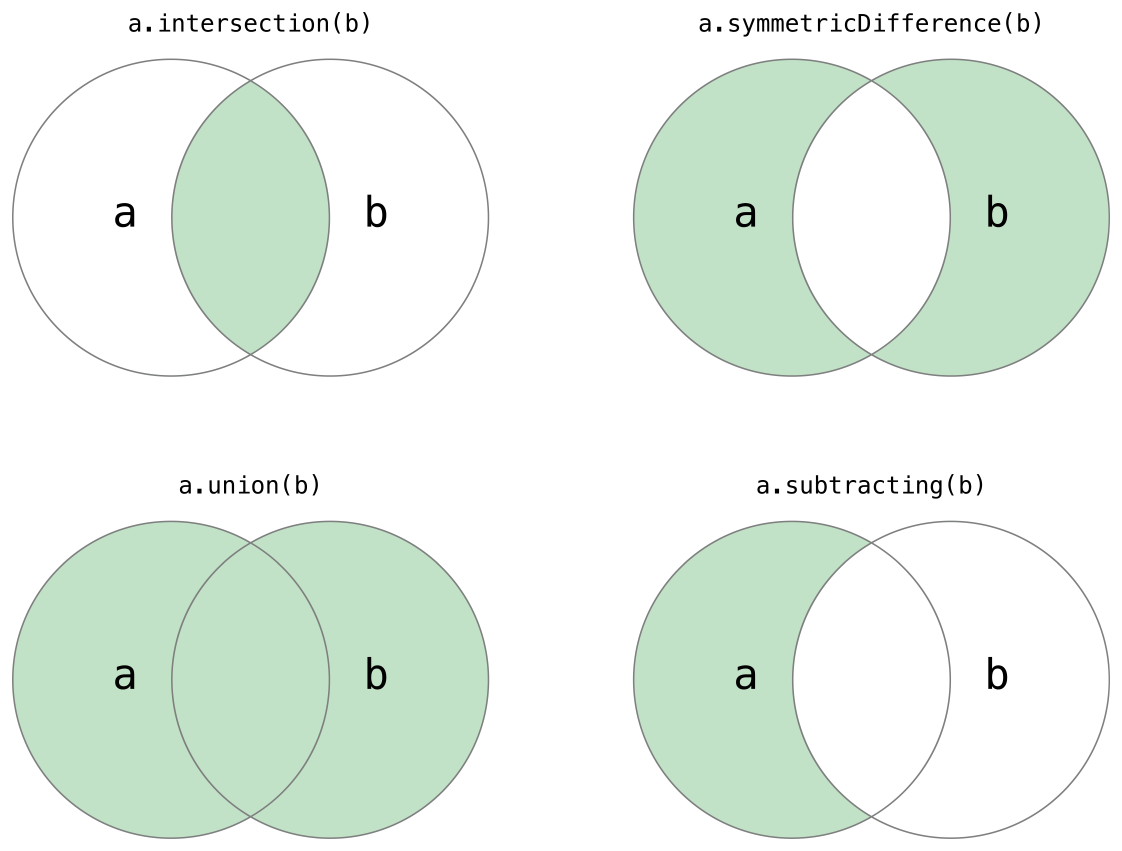
- 使用
intersection(_:)方法根据两个集合的交集创建一个新的集合。 - 使用
symmetricDifference(_:)方法根据两个集合不相交的值创建一个新的集合。 - 使用
union(_:)方法根据两个集合的所有值创建一个新的集合。 - 使用
subtracting(_:)方法根据不在另一个集合中的值创建一个新的集合。
let oddDigits: Set = [1, 3, 5, 7, 9]
let evenDigits: Set = [0, 2, 4, 6, 8]
let singleDigitPrimeNumbers: Set = [2, 3, 5, 7]

oddDigits.union(evenDigits).sorted()
// [0, 1, 2, 3, 4, 5, 6, 7, 8, 9]
oddDigits.interaction(evenDigits).sorted()
// []
oddDigits.subtracting(singleDigitPrimeNumbers).sorted()
// [1, 9]
oddDigits.symmetricDifference(singleDigitPrimeNumbers).sorted()
// [1, 2, 9]
2.5.2 集合成员关系和相等
下面的插图描述了三个集合 a、b 和 c,以及通过重叠区域表述集合间共享的元素。集合 a 是集合 b 的父集合,因为 a 包含了 b 中所有的元素。相反的,集合 b 是集合 a 的子集合,因为属于 b 的元素也被 a 包含。集合 b 和集合 c 是不相交的,因为它们之间没有共同的元素。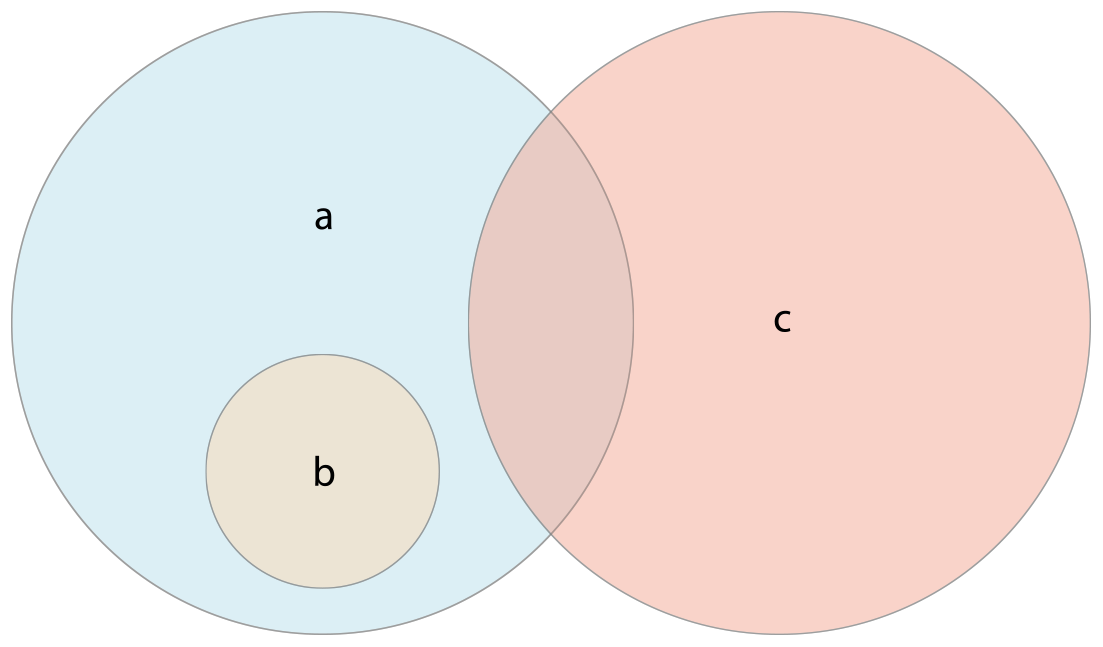
- 使用“是否相等”运算符(
==)来判断两个集合包含的值是否全部相同。 - 使用
isSubset(of:)方法来判断一个集合中的所有值是否也被包含在另外一个集合中。 - 使用
isSuperset(of:)方法来判断一个集合是否包含另一个集合中所有的值。 - 使用
isStrictSubset(of:)或者isStrictSuperset(of:)方法来判断一个集合是否是另外一个集合的子集合或者父集合并且两个集合并不相等。 - 使用
isDisjoint(with:)方法来判断两个集合是否不含有相同的值(是否没有交集)
let houseAnimals: Set = ["🐶", "🐱"]
let farmAnimals: Set = ["🐮", "🐔", "🐑", "🐶", "🐱"]
let cityAnimals: Set = ["🐦", "🐭"]

houseAnimals.isSubset(of: farmAnimals)
// true
farmAnimals.isSuperset(of: houseAnimals)
// true
farmAnimals.isDisjoint(with: cityAnimals)
// true
3.字典
3.1 字典类型简化语法
Dictionary<Key, Value> 或者 [Key: Value]
3.2 创建字典
3.2.1 构造语法创建空字典
可以像数组一样使用构造语法创建一个拥有确定类型的空字典:
var namesOfIntegers = [Int: String]()
// namesOfIntegers 是一个空的 [Int: String] 字典
3.2.2 用字典字面量创建字典
如果上下文已经提供了类型信息,可以使用空字典字面量来创建一个空字典,记作
[:]namesOfIntegers[16] = "sixteen" //namesOfIntegers 现在包含一个键值对 namesOfIntegers = [:] // nameOfIntegers 又成为了一个 [Int: String] 类型的空字典用字典字面量创建字典
var airports: [String: String] = ["YYZ": "Toronto Pearson", "DUB": "Dublin"]
//如果键和值都有各自统一的类型,可以不必写出字典的类型
var airports = ["YYZ": "Toronto Pearson", "DUB": "Dublin"]
3.3 访问和修改字典
3.3.1 获取字典元素数量
可以通过 Dictionary 的只读属性 count 来获取字典的数据项数量:
print("The dictionary of airports contains \(airports.count) items.")
3.3.2 isEmpty检查字典元素数量是否等于0
使用布尔属性 isEmpty 作为一个缩写形式去检查 count 属性是否为 0:
if airports.isEmpty {
    print("The airports dictionary is empty.")
} else {
    print("The airports dictionary is not empty.")
}
3.3.3 添加新元素
可以通过下标语法来给字典添加新的数据项。
airports["LHR"] = "London"
// airports 字典现在有三个数据项
3.3.4 改变某个key对应的元素值
也可以使用下标语法来改变特定键对应的值
airports["LHR"] = "London Heathrow"
// "LHR" 对应的值被改为 “London Heathrow”
3.3.5 获取某个key对应的元素值
可以使用下标语法来在字典中检索特定键对应的值,返回对应值类型的可选类型。
if let airportName = airports["DUB"] {
    print("The name of the airport is \(airportName).")
} else {
    print("That airport is not in the airports dictionary.")
}
//打印 “The name of the airport is Dublin Airport.”
3.3.6 移除某个key对应的元素值
- 可以使用下标语法通过将某个键的对应值赋值为 nil 来从字典里移除一个键值对
airports["APL"] = "Apple Internation"
airports["APL"] = nil
作为一种替代下标语法的方式,字典的
updateValue(_:forKey:)方法可以设置或者更新特定键对应的值。就像上面所示的下标示例,updateValue(_:forKey:)方法在这个键不存在对应值的时候会设置新值或者在存在时更新已存在的值。和下标的方式不同,updateValue(_:forKey:)这个方法返回更新值之前的原值(可选类型)。这样使得你可以检查更新是否成功。if let oldValue = airports.updateValue("Dublin Airport", forKey:"DUB") { print("The old value for DUB was \(oldValue).") } // 输出 “The old value for DUB was Dublin.”
3.4 字典遍历
使用
for-in遍历,每个字典中的数据项都以(key, value)元组形式返回for (airportCode, airportName) in airports { print("\(airportCode): \(airportName)") } // YYZ: Toronto Pearson // LHR: London Heathrow通过访问
keys或者values属性,你也可以遍历字典的键或者值:for airportCode in airports.keys { print("Airport code: \(airportCode)") } // Airport code: YYZ // Airport code: LHR for airportName in airports.values { print("Airport name: \(airportName)") } // Airport name: Toronto Pearson // Airport name: London Heathrow可以直接使用
keys或者values属性构造一个新数组:let airportCodes = [String](airports.keys) let airportName = [String](airports.values)
Swift 的 Dictionary 是无序集合类型。为了以特定的顺序遍历字典的键或值,可以对字典的 keys 或 values 属性使用 sorted() 方法。